Note
Go to the end to download the full example code.
Exporting trace data with, e.g., length and azimuth attributes included
fractopo provides ready-to-use calculations for attributes such as the
length and orientation of fracture traces or branches. These attributes,
calculated with fractopo, might be useful for use elsewhere.
Two examples are provided:
Call of
fractopoprovided functions to calculate length and orientation into new columns in a GeoDataFrame.Use of builtin
Networkfunctionality to realize these attributes into thetrace_gdfused by the network and then exporting it afterwards.
Initializing and loading of example trace and area data
from pathlib import Path
from tempfile import TemporaryDirectory

import geopandas as gpd
import matplotlib.pyplot as plt

from fractopo.analysis.network import Network
from fractopo.general import Col, determine_azimuth

BASE_DIR_PATH = Path("..")

KB11_TRACE_GDF = gpd.read_file(
    BASE_DIR_PATH.joinpath(Path("tests/sample_data/KB11/KB11_traces.geojson"))
)
KB11_AREA_GDF = gpd.read_file(
    BASE_DIR_PATH.joinpath(Path("tests/sample_data/KB11/KB11_area.geojson"))
)
1. Call of fractopo provided functions
This method will not modify the trace geometries in any way. Only the attributes are calculated.
# Create copy so that the original KB11_TRACE_GDF is not modified
kb11_trace_gdf_1 = KB11_TRACE_GDF.copy()
Calculate length and azimuth
# ``geopandas``, through ``shapely``, already provides easy
# calculation of geometry lengths using the length attribute
kb11_trace_gdf_1["length"] = kb11_trace_gdf_1.geometry.length

# How to calculate the azimuth, i.e. orientation, is more subjective.
# ``fractopo`` defaults to a simple approach, where the orientation
# is defined solely by the start and end points of a trace.
kb11_trace_gdf_1["azimuth"] = [
    determine_azimuth(line=trace, halved=True)
    for trace in kb11_trace_gdf_1.geometry.values
]
Export trace GeoDataFrame
# Do not use TemporaryDirectory yourself if you want to persist the data!
with TemporaryDirectory() as tmp_dir:
    output_path_1 = Path(tmp_dir).joinpath("KB11_traces_with_length_and_azimuth.gpkg")
    kb11_trace_gdf_1.to_file(output_path_1, driver="GPKG")
2. Use of builtin Network functionality
This method can modify the traces by, e.g., truncating them to
the target area (truncate_traces=True).
KB11_NETWORK = Network(
    name="KB11",
    trace_gdf=KB11_TRACE_GDF,
    area_gdf=KB11_AREA_GDF,
    truncate_traces=True,
    circular_target_area=False,
    determine_branches_nodes=True,
    snap_threshold=0.001,
    azimuth_set_names=("N-S", "E-W"),
    azimuth_set_ranges=((135, 45), (45, 135)),
)
Check that length and azimuth columns do not pre-exist in network
assert (
    len(
        set(KB11_NETWORK.trace_gdf.columns).intersection(
            {Col.LENGTH.value, Col.AZIMUTH.value}
        )
    )
    == 0
)
Access trace length and orientation arrays
KB11_NETWORK.trace_length_array
KB11_NETWORK.trace_azimuth_array

# Check that underlying GeoDataFrame now contains columns for length and
# azimuths
assert (
    len(
        set(KB11_NETWORK.trace_gdf.columns).intersection(
            {Col.LENGTH.value, Col.AZIMUTH.value}
        )
    )
    == 2
)
Export trace GeoDataFrame
# Do not use TemporaryDirectory yourself if you want to persist the data!
with TemporaryDirectory() as tmp_dir:
    output_path_2 = Path(tmp_dir).joinpath("KB11_traces_with_network_attributes.gpkg")
    KB11_NETWORK.trace_gdf.to_file(output_path_2, driver="GPKG")
Show a preview of the exported data as a table
preview_df = KB11_NETWORK.trace_gdf[[Col.LENGTH.value, Col.AZIMUTH.value]].head(5)

fig, ax = plt.subplots(figsize=(12, 4))
ax.axis("off")
tbl = ax.table(cellText=preview_df.values, colLabels=preview_df.columns, loc="center")
tbl.set_fontsize(16)
tbl.scale(1.2, 1.2)
ax.set_title("Preview of exported trace attributes")
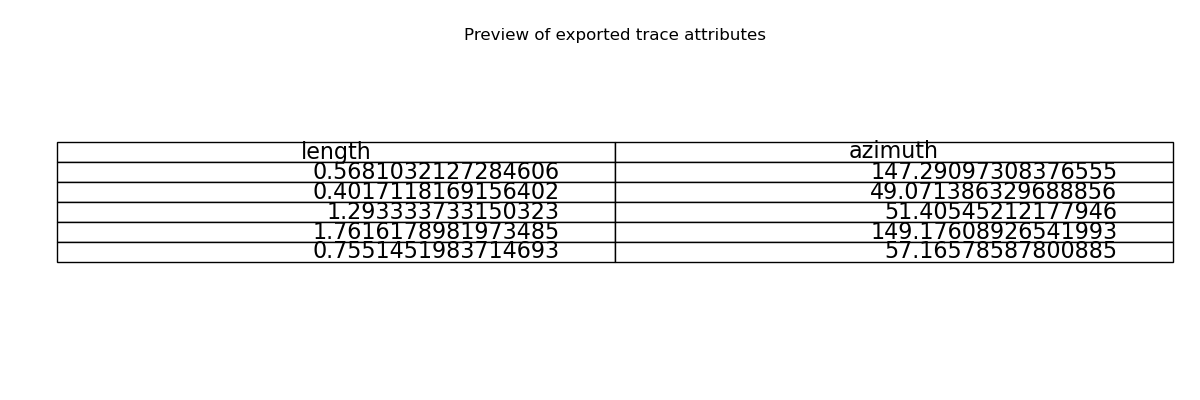
Text(0.5, 1.0, 'Preview of exported trace attributes')
3. Recommended: Use export_network_analysis for complete export
The recommended way to export all relevant network analysis results is to use the built-in export_network_analysis method. This outputs traces, plots, parameters, and key arrays in one standardized directory:
from tempfile import TemporaryDirectory

with TemporaryDirectory() as tmp_dir:
    export_dir = Path(tmp_dir).joinpath("KB11_network_analysis_export")
    KB11_NETWORK.export_network_analysis(output_path=export_dir)
    plt.close("all")
<@beartype(fractopo.general.write_geodataframe) at 0x7fffa16ecea0>:69: UserWarning: Shapefile export truncates long field names and may rename columns; use GPKG or GeoJSON for full names.
<@beartype(fractopo.general.write_geodataframe) at 0x7fffa16ecea0>:69: UserWarning: Shapefile export truncates long field names and may rename columns; use GPKG or GeoJSON for full names.
/nix/store/ls0zpadmkl4hnqa5ciw6qlxv1mm8qd3p-python3.13-pyogrio-0.11.1/lib/python3.13/site-packages/pyogrio/raw.py:723: RuntimeWarning: Normalized/laundered field name: 'Trace Boundary 0 Intersect Count' to 'Trace_Boundary_0_Intersect_Count'
  ogr_write(
/nix/store/ls0zpadmkl4hnqa5ciw6qlxv1mm8qd3p-python3.13-pyogrio-0.11.1/lib/python3.13/site-packages/pyogrio/raw.py:723: RuntimeWarning: Normalized/laundered field name: 'Trace Boundary 1 Intersect Count' to 'Trace_Boundary_1_Intersect_Count'
  ogr_write(
/nix/store/ls0zpadmkl4hnqa5ciw6qlxv1mm8qd3p-python3.13-pyogrio-0.11.1/lib/python3.13/site-packages/pyogrio/raw.py:723: RuntimeWarning: Normalized/laundered field name: 'Trace Boundary 2 Intersect Count' to 'Trace_Boundary_2_Intersect_Count'
  ogr_write(
/nix/store/ls0zpadmkl4hnqa5ciw6qlxv1mm8qd3p-python3.13-pyogrio-0.11.1/lib/python3.13/site-packages/pyogrio/raw.py:723: RuntimeWarning: Normalized/laundered field name: 'Branch Boundary 0 Intersect Count' to 'Branch_Boundary_0_Intersect_Count'
  ogr_write(
/nix/store/ls0zpadmkl4hnqa5ciw6qlxv1mm8qd3p-python3.13-pyogrio-0.11.1/lib/python3.13/site-packages/pyogrio/raw.py:723: RuntimeWarning: Normalized/laundered field name: 'Branch Boundary 1 Intersect Count' to 'Branch_Boundary_1_Intersect_Count'
  ogr_write(
/nix/store/ls0zpadmkl4hnqa5ciw6qlxv1mm8qd3p-python3.13-pyogrio-0.11.1/lib/python3.13/site-packages/pyogrio/raw.py:723: RuntimeWarning: Normalized/laundered field name: 'Branch Boundary 2 Intersect Count' to 'Branch_Boundary_2_Intersect_Count'
  ogr_write(
/nix/store/ls0zpadmkl4hnqa5ciw6qlxv1mm8qd3p-python3.13-pyogrio-0.11.1/lib/python3.13/site-packages/pyogrio/raw.py:723: RuntimeWarning: Normalized/laundered field name: 'C - C' to 'C___C'
  ogr_write(
/nix/store/ls0zpadmkl4hnqa5ciw6qlxv1mm8qd3p-python3.13-pyogrio-0.11.1/lib/python3.13/site-packages/pyogrio/raw.py:723: RuntimeWarning: Normalized/laundered field name: 'C - I' to 'C___I'
  ogr_write(
/nix/store/ls0zpadmkl4hnqa5ciw6qlxv1mm8qd3p-python3.13-pyogrio-0.11.1/lib/python3.13/site-packages/pyogrio/raw.py:723: RuntimeWarning: Normalized/laundered field name: 'I - I' to 'I___I'
  ogr_write(
/nix/store/ls0zpadmkl4hnqa5ciw6qlxv1mm8qd3p-python3.13-pyogrio-0.11.1/lib/python3.13/site-packages/pyogrio/raw.py:723: RuntimeWarning: Normalized/laundered field name: 'C - E' to 'C___E'
  ogr_write(
/nix/store/ls0zpadmkl4hnqa5ciw6qlxv1mm8qd3p-python3.13-pyogrio-0.11.1/lib/python3.13/site-packages/pyogrio/raw.py:723: RuntimeWarning: Normalized/laundered field name: 'I - E' to 'I___E'
  ogr_write(
/nix/store/ls0zpadmkl4hnqa5ciw6qlxv1mm8qd3p-python3.13-pyogrio-0.11.1/lib/python3.13/site-packages/pyogrio/raw.py:723: RuntimeWarning: Normalized/laundered field name: 'E - E' to 'E___E'
  ogr_write(
/nix/store/ls0zpadmkl4hnqa5ciw6qlxv1mm8qd3p-python3.13-pyogrio-0.11.1/lib/python3.13/site-packages/pyogrio/raw.py:723: RuntimeWarning: Normalized/laundered field name: 'Fracture Intensity B21' to 'Fracture_Intensity_B21'
  ogr_write(
/nix/store/ls0zpadmkl4hnqa5ciw6qlxv1mm8qd3p-python3.13-pyogrio-0.11.1/lib/python3.13/site-packages/pyogrio/raw.py:723: RuntimeWarning: Normalized/laundered field name: 'Fracture Intensity P21' to 'Fracture_Intensity_P21'
  ogr_write(
/nix/store/ls0zpadmkl4hnqa5ciw6qlxv1mm8qd3p-python3.13-pyogrio-0.11.1/lib/python3.13/site-packages/pyogrio/raw.py:723: RuntimeWarning: Normalized/laundered field name: 'Trace Min Length' to 'Trace_Min_Length'
  ogr_write(
/nix/store/ls0zpadmkl4hnqa5ciw6qlxv1mm8qd3p-python3.13-pyogrio-0.11.1/lib/python3.13/site-packages/pyogrio/raw.py:723: RuntimeWarning: Normalized/laundered field name: 'Trace Max Length' to 'Trace_Max_Length'
  ogr_write(
/nix/store/ls0zpadmkl4hnqa5ciw6qlxv1mm8qd3p-python3.13-pyogrio-0.11.1/lib/python3.13/site-packages/pyogrio/raw.py:723: RuntimeWarning: Normalized/laundered field name: 'Trace Mean Length' to 'Trace_Mean_Length'
  ogr_write(
/nix/store/ls0zpadmkl4hnqa5ciw6qlxv1mm8qd3p-python3.13-pyogrio-0.11.1/lib/python3.13/site-packages/pyogrio/raw.py:723: RuntimeWarning: Normalized/laundered field name: 'Dimensionless Intensity P22' to 'Dimensionless_Intensity_P22'
  ogr_write(
/nix/store/ls0zpadmkl4hnqa5ciw6qlxv1mm8qd3p-python3.13-pyogrio-0.11.1/lib/python3.13/site-packages/pyogrio/raw.py:723: RuntimeWarning: Normalized/laundered field name: 'Number of Traces (Real)' to 'Number_of_Traces__Real_'
  ogr_write(
/nix/store/ls0zpadmkl4hnqa5ciw6qlxv1mm8qd3p-python3.13-pyogrio-0.11.1/lib/python3.13/site-packages/pyogrio/raw.py:723: RuntimeWarning: Normalized/laundered field name: 'Number of Traces' to 'Number_of_Traces'
  ogr_write(
/nix/store/ls0zpadmkl4hnqa5ciw6qlxv1mm8qd3p-python3.13-pyogrio-0.11.1/lib/python3.13/site-packages/pyogrio/raw.py:723: RuntimeWarning: Normalized/laundered field name: 'Branch Min Length' to 'Branch_Min_Length'
  ogr_write(
/nix/store/ls0zpadmkl4hnqa5ciw6qlxv1mm8qd3p-python3.13-pyogrio-0.11.1/lib/python3.13/site-packages/pyogrio/raw.py:723: RuntimeWarning: Normalized/laundered field name: 'Branch Max Length' to 'Branch_Max_Length'
  ogr_write(
/nix/store/ls0zpadmkl4hnqa5ciw6qlxv1mm8qd3p-python3.13-pyogrio-0.11.1/lib/python3.13/site-packages/pyogrio/raw.py:723: RuntimeWarning: Normalized/laundered field name: 'Branch Mean Length' to 'Branch_Mean_Length'
  ogr_write(
/nix/store/ls0zpadmkl4hnqa5ciw6qlxv1mm8qd3p-python3.13-pyogrio-0.11.1/lib/python3.13/site-packages/pyogrio/raw.py:723: RuntimeWarning: Normalized/laundered field name: 'Areal Frequency B20' to 'Areal_Frequency_B20'
  ogr_write(
/nix/store/ls0zpadmkl4hnqa5ciw6qlxv1mm8qd3p-python3.13-pyogrio-0.11.1/lib/python3.13/site-packages/pyogrio/raw.py:723: RuntimeWarning: Normalized/laundered field name: 'Areal Frequency P20' to 'Areal_Frequency_P20'
  ogr_write(
/nix/store/ls0zpadmkl4hnqa5ciw6qlxv1mm8qd3p-python3.13-pyogrio-0.11.1/lib/python3.13/site-packages/pyogrio/raw.py:723: RuntimeWarning: Normalized/laundered field name: 'Dimensionless Intensity B22' to 'Dimensionless_Intensity_B22'
  ogr_write(
/nix/store/ls0zpadmkl4hnqa5ciw6qlxv1mm8qd3p-python3.13-pyogrio-0.11.1/lib/python3.13/site-packages/pyogrio/raw.py:723: RuntimeWarning: Normalized/laundered field name: 'Connections per Trace' to 'Connections_per_Trace'
  ogr_write(
/nix/store/ls0zpadmkl4hnqa5ciw6qlxv1mm8qd3p-python3.13-pyogrio-0.11.1/lib/python3.13/site-packages/pyogrio/raw.py:723: RuntimeWarning: Normalized/laundered field name: 'Connections per Branch' to 'Connections_per_Branch'
  ogr_write(
/nix/store/ls0zpadmkl4hnqa5ciw6qlxv1mm8qd3p-python3.13-pyogrio-0.11.1/lib/python3.13/site-packages/pyogrio/raw.py:723: RuntimeWarning: Normalized/laundered field name: 'Fracture Intensity (Mauldon)' to 'Fracture_Intensity__Mauldon_'
  ogr_write(
/nix/store/ls0zpadmkl4hnqa5ciw6qlxv1mm8qd3p-python3.13-pyogrio-0.11.1/lib/python3.13/site-packages/pyogrio/raw.py:723: RuntimeWarning: Normalized/laundered field name: 'Fracture Density (Mauldon)' to 'Fracture_Density__Mauldon_'
  ogr_write(
/nix/store/ls0zpadmkl4hnqa5ciw6qlxv1mm8qd3p-python3.13-pyogrio-0.11.1/lib/python3.13/site-packages/pyogrio/raw.py:723: RuntimeWarning: Normalized/laundered field name: 'Trace Mean Length (Mauldon)' to 'Trace_Mean_Length__Mauldon_'
  ogr_write(
/nix/store/ls0zpadmkl4hnqa5ciw6qlxv1mm8qd3p-python3.13-pyogrio-0.11.1/lib/python3.13/site-packages/pyogrio/raw.py:723: RuntimeWarning: Normalized/laundered field name: 'Connection Frequency' to 'Connection_Frequency'
  ogr_write(
/nix/store/ls0zpadmkl4hnqa5ciw6qlxv1mm8qd3p-python3.13-pyogrio-0.11.1/lib/python3.13/site-packages/pyogrio/raw.py:723: RuntimeWarning: Normalized/laundered field name: 'Number of Branches' to 'Number_of_Branches'
  ogr_write(
/nix/store/ls0zpadmkl4hnqa5ciw6qlxv1mm8qd3p-python3.13-pyogrio-0.11.1/lib/python3.13/site-packages/pyogrio/raw.py:723: RuntimeWarning: Normalized/laundered field name: 'Number of Branches (Real)' to 'Number_of_Branches__Real_'
  ogr_write(
/nix/store/ls0zpadmkl4hnqa5ciw6qlxv1mm8qd3p-python3.13-pyogrio-0.11.1/lib/python3.13/site-packages/pyogrio/raw.py:723: RuntimeWarning: Normalized/laundered field name: 'trace power_law vs. lognormal R' to 'trace_power_law_vs__lognormal_R'
  ogr_write(
/nix/store/ls0zpadmkl4hnqa5ciw6qlxv1mm8qd3p-python3.13-pyogrio-0.11.1/lib/python3.13/site-packages/pyogrio/raw.py:723: RuntimeWarning: Normalized/laundered field name: 'trace power_law vs. lognormal p' to 'trace_power_law_vs__lognormal_p'
  ogr_write(
/nix/store/ls0zpadmkl4hnqa5ciw6qlxv1mm8qd3p-python3.13-pyogrio-0.11.1/lib/python3.13/site-packages/pyogrio/raw.py:723: RuntimeWarning: Normalized/laundered field name: 'trace power_law vs. exponential R' to 'trace_power_law_vs__exponential_R'
  ogr_write(
/nix/store/ls0zpadmkl4hnqa5ciw6qlxv1mm8qd3p-python3.13-pyogrio-0.11.1/lib/python3.13/site-packages/pyogrio/raw.py:723: RuntimeWarning: Normalized/laundered field name: 'trace power_law vs. exponential p' to 'trace_power_law_vs__exponential_p'
  ogr_write(
/nix/store/ls0zpadmkl4hnqa5ciw6qlxv1mm8qd3p-python3.13-pyogrio-0.11.1/lib/python3.13/site-packages/pyogrio/raw.py:723: RuntimeWarning: Normalized/laundered field name: 'trace lognormal vs. exponential R' to 'trace_lognormal_vs__exponential_R'
  ogr_write(
/nix/store/ls0zpadmkl4hnqa5ciw6qlxv1mm8qd3p-python3.13-pyogrio-0.11.1/lib/python3.13/site-packages/pyogrio/raw.py:723: RuntimeWarning: Normalized/laundered field name: 'trace lognormal vs. exponential p' to 'trace_lognormal_vs__exponential_p'
  ogr_write(
/nix/store/ls0zpadmkl4hnqa5ciw6qlxv1mm8qd3p-python3.13-pyogrio-0.11.1/lib/python3.13/site-packages/pyogrio/raw.py:723: RuntimeWarning: Normalized/laundered field name: 'trace power_law vs. truncated_power_law R' to 'trace_power_law_vs__truncated_power_law_R'
  ogr_write(
/nix/store/ls0zpadmkl4hnqa5ciw6qlxv1mm8qd3p-python3.13-pyogrio-0.11.1/lib/python3.13/site-packages/pyogrio/raw.py:723: RuntimeWarning: Normalized/laundered field name: 'trace power_law vs. truncated_power_law p' to 'trace_power_law_vs__truncated_power_law_p'
  ogr_write(
/nix/store/ls0zpadmkl4hnqa5ciw6qlxv1mm8qd3p-python3.13-pyogrio-0.11.1/lib/python3.13/site-packages/pyogrio/raw.py:723: RuntimeWarning: Normalized/laundered field name: 'trace power_law Kolmogorov-Smirnov distance D' to 'trace_power_law_Kolmogorov_Smirnov_distance_D'
  ogr_write(
/nix/store/ls0zpadmkl4hnqa5ciw6qlxv1mm8qd3p-python3.13-pyogrio-0.11.1/lib/python3.13/site-packages/pyogrio/raw.py:723: RuntimeWarning: Normalized/laundered field name: 'trace exponential Kolmogorov-Smirnov distance D' to 'trace_exponential_Kolmogorov_Smirnov_distance_D'
  ogr_write(
/nix/store/ls0zpadmkl4hnqa5ciw6qlxv1mm8qd3p-python3.13-pyogrio-0.11.1/lib/python3.13/site-packages/pyogrio/raw.py:723: RuntimeWarning: Normalized/laundered field name: 'trace lognormal Kolmogorov-Smirnov distance D' to 'trace_lognormal_Kolmogorov_Smirnov_distance_D'
  ogr_write(
/nix/store/ls0zpadmkl4hnqa5ciw6qlxv1mm8qd3p-python3.13-pyogrio-0.11.1/lib/python3.13/site-packages/pyogrio/raw.py:723: RuntimeWarning: Normalized/laundered field name: 'trace truncated_power_law Kolmogorov-Smirnov distance D' to 'trace_truncated_power_law_Kolmogorov_Smirnov_distance_D'
  ogr_write(
/nix/store/ls0zpadmkl4hnqa5ciw6qlxv1mm8qd3p-python3.13-pyogrio-0.11.1/lib/python3.13/site-packages/pyogrio/raw.py:723: RuntimeWarning: Normalized/laundered field name: 'trace Kolmogorov-Smirnov critical distance value' to 'trace_Kolmogorov_Smirnov_critical_distance_value'
  ogr_write(
/nix/store/ls0zpadmkl4hnqa5ciw6qlxv1mm8qd3p-python3.13-pyogrio-0.11.1/lib/python3.13/site-packages/pyogrio/raw.py:723: RuntimeWarning: Normalized/laundered field name: 'trace power_law alpha' to 'trace_power_law_alpha'
  ogr_write(
/nix/store/ls0zpadmkl4hnqa5ciw6qlxv1mm8qd3p-python3.13-pyogrio-0.11.1/lib/python3.13/site-packages/pyogrio/raw.py:723: RuntimeWarning: Normalized/laundered field name: 'trace power_law exponent' to 'trace_power_law_exponent'
  ogr_write(
/nix/store/ls0zpadmkl4hnqa5ciw6qlxv1mm8qd3p-python3.13-pyogrio-0.11.1/lib/python3.13/site-packages/pyogrio/raw.py:723: RuntimeWarning: Normalized/laundered field name: 'trace power_law cut-off' to 'trace_power_law_cut_off'
  ogr_write(
/nix/store/ls0zpadmkl4hnqa5ciw6qlxv1mm8qd3p-python3.13-pyogrio-0.11.1/lib/python3.13/site-packages/pyogrio/raw.py:723: RuntimeWarning: Normalized/laundered field name: 'trace power_law sigma' to 'trace_power_law_sigma'
  ogr_write(
/nix/store/ls0zpadmkl4hnqa5ciw6qlxv1mm8qd3p-python3.13-pyogrio-0.11.1/lib/python3.13/site-packages/pyogrio/raw.py:723: RuntimeWarning: Normalized/laundered field name: 'trace lognormal sigma' to 'trace_lognormal_sigma'
  ogr_write(
/nix/store/ls0zpadmkl4hnqa5ciw6qlxv1mm8qd3p-python3.13-pyogrio-0.11.1/lib/python3.13/site-packages/pyogrio/raw.py:723: RuntimeWarning: Normalized/laundered field name: 'trace lognormal mu' to 'trace_lognormal_mu'
  ogr_write(
/nix/store/ls0zpadmkl4hnqa5ciw6qlxv1mm8qd3p-python3.13-pyogrio-0.11.1/lib/python3.13/site-packages/pyogrio/raw.py:723: RuntimeWarning: Normalized/laundered field name: 'trace exponential lambda' to 'trace_exponential_lambda'
  ogr_write(
/nix/store/ls0zpadmkl4hnqa5ciw6qlxv1mm8qd3p-python3.13-pyogrio-0.11.1/lib/python3.13/site-packages/pyogrio/raw.py:723: RuntimeWarning: Normalized/laundered field name: 'trace truncated_power_law lambda' to 'trace_truncated_power_law_lambda'
  ogr_write(
/nix/store/ls0zpadmkl4hnqa5ciw6qlxv1mm8qd3p-python3.13-pyogrio-0.11.1/lib/python3.13/site-packages/pyogrio/raw.py:723: RuntimeWarning: Normalized/laundered field name: 'trace truncated_power_law alpha' to 'trace_truncated_power_law_alpha'
  ogr_write(
/nix/store/ls0zpadmkl4hnqa5ciw6qlxv1mm8qd3p-python3.13-pyogrio-0.11.1/lib/python3.13/site-packages/pyogrio/raw.py:723: RuntimeWarning: Normalized/laundered field name: 'trace truncated_power_law exponent' to 'trace_truncated_power_law_exponent'
  ogr_write(
/nix/store/ls0zpadmkl4hnqa5ciw6qlxv1mm8qd3p-python3.13-pyogrio-0.11.1/lib/python3.13/site-packages/pyogrio/raw.py:723: RuntimeWarning: Normalized/laundered field name: 'trace lognormal loglikelihood' to 'trace_lognormal_loglikelihood'
  ogr_write(
/nix/store/ls0zpadmkl4hnqa5ciw6qlxv1mm8qd3p-python3.13-pyogrio-0.11.1/lib/python3.13/site-packages/pyogrio/raw.py:723: RuntimeWarning: Normalized/laundered field name: 'trace exponential loglikelihood' to 'trace_exponential_loglikelihood'
  ogr_write(
/nix/store/ls0zpadmkl4hnqa5ciw6qlxv1mm8qd3p-python3.13-pyogrio-0.11.1/lib/python3.13/site-packages/pyogrio/raw.py:723: RuntimeWarning: Normalized/laundered field name: 'trace truncated_power_law loglikelihood' to 'trace_truncated_power_law_loglikelihood'
  ogr_write(
/nix/store/ls0zpadmkl4hnqa5ciw6qlxv1mm8qd3p-python3.13-pyogrio-0.11.1/lib/python3.13/site-packages/pyogrio/raw.py:723: RuntimeWarning: Normalized/laundered field name: 'trace lengths cut off proportion' to 'trace_lengths_cut_off_proportion'
  ogr_write(
/nix/store/ls0zpadmkl4hnqa5ciw6qlxv1mm8qd3p-python3.13-pyogrio-0.11.1/lib/python3.13/site-packages/pyogrio/raw.py:723: RuntimeWarning: Normalized/laundered field name: 'branch power_law vs. lognormal R' to 'branch_power_law_vs__lognormal_R'
  ogr_write(
/nix/store/ls0zpadmkl4hnqa5ciw6qlxv1mm8qd3p-python3.13-pyogrio-0.11.1/lib/python3.13/site-packages/pyogrio/raw.py:723: RuntimeWarning: Normalized/laundered field name: 'branch power_law vs. lognormal p' to 'branch_power_law_vs__lognormal_p'
  ogr_write(
/nix/store/ls0zpadmkl4hnqa5ciw6qlxv1mm8qd3p-python3.13-pyogrio-0.11.1/lib/python3.13/site-packages/pyogrio/raw.py:723: RuntimeWarning: Normalized/laundered field name: 'branch power_law vs. exponential R' to 'branch_power_law_vs__exponential_R'
  ogr_write(
/nix/store/ls0zpadmkl4hnqa5ciw6qlxv1mm8qd3p-python3.13-pyogrio-0.11.1/lib/python3.13/site-packages/pyogrio/raw.py:723: RuntimeWarning: Normalized/laundered field name: 'branch power_law vs. exponential p' to 'branch_power_law_vs__exponential_p'
  ogr_write(
/nix/store/ls0zpadmkl4hnqa5ciw6qlxv1mm8qd3p-python3.13-pyogrio-0.11.1/lib/python3.13/site-packages/pyogrio/raw.py:723: RuntimeWarning: Normalized/laundered field name: 'branch lognormal vs. exponential R' to 'branch_lognormal_vs__exponential_R'
  ogr_write(
/nix/store/ls0zpadmkl4hnqa5ciw6qlxv1mm8qd3p-python3.13-pyogrio-0.11.1/lib/python3.13/site-packages/pyogrio/raw.py:723: RuntimeWarning: Normalized/laundered field name: 'branch lognormal vs. exponential p' to 'branch_lognormal_vs__exponential_p'
  ogr_write(
/nix/store/ls0zpadmkl4hnqa5ciw6qlxv1mm8qd3p-python3.13-pyogrio-0.11.1/lib/python3.13/site-packages/pyogrio/raw.py:723: RuntimeWarning: Normalized/laundered field name: 'branch power_law vs. truncated_power_law R' to 'branch_power_law_vs__truncated_power_law_R'
  ogr_write(
/nix/store/ls0zpadmkl4hnqa5ciw6qlxv1mm8qd3p-python3.13-pyogrio-0.11.1/lib/python3.13/site-packages/pyogrio/raw.py:723: RuntimeWarning: Normalized/laundered field name: 'branch power_law vs. truncated_power_law p' to 'branch_power_law_vs__truncated_power_law_p'
  ogr_write(
/nix/store/ls0zpadmkl4hnqa5ciw6qlxv1mm8qd3p-python3.13-pyogrio-0.11.1/lib/python3.13/site-packages/pyogrio/raw.py:723: RuntimeWarning: Normalized/laundered field name: 'branch power_law Kolmogorov-Smirnov distance D' to 'branch_power_law_Kolmogorov_Smirnov_distance_D'
  ogr_write(
/nix/store/ls0zpadmkl4hnqa5ciw6qlxv1mm8qd3p-python3.13-pyogrio-0.11.1/lib/python3.13/site-packages/pyogrio/raw.py:723: RuntimeWarning: Normalized/laundered field name: 'branch exponential Kolmogorov-Smirnov distance D' to 'branch_exponential_Kolmogorov_Smirnov_distance_D'
  ogr_write(
/nix/store/ls0zpadmkl4hnqa5ciw6qlxv1mm8qd3p-python3.13-pyogrio-0.11.1/lib/python3.13/site-packages/pyogrio/raw.py:723: RuntimeWarning: Normalized/laundered field name: 'branch lognormal Kolmogorov-Smirnov distance D' to 'branch_lognormal_Kolmogorov_Smirnov_distance_D'
  ogr_write(
/nix/store/ls0zpadmkl4hnqa5ciw6qlxv1mm8qd3p-python3.13-pyogrio-0.11.1/lib/python3.13/site-packages/pyogrio/raw.py:723: RuntimeWarning: Normalized/laundered field name: 'branch truncated_power_law Kolmogorov-Smirnov distance D' to 'branch_truncated_power_law_Kolmogorov_Smirnov_distance_D'
  ogr_write(
/nix/store/ls0zpadmkl4hnqa5ciw6qlxv1mm8qd3p-python3.13-pyogrio-0.11.1/lib/python3.13/site-packages/pyogrio/raw.py:723: RuntimeWarning: Normalized/laundered field name: 'branch Kolmogorov-Smirnov critical distance value' to 'branch_Kolmogorov_Smirnov_critical_distance_value'
  ogr_write(
/nix/store/ls0zpadmkl4hnqa5ciw6qlxv1mm8qd3p-python3.13-pyogrio-0.11.1/lib/python3.13/site-packages/pyogrio/raw.py:723: RuntimeWarning: Normalized/laundered field name: 'branch power_law alpha' to 'branch_power_law_alpha'
  ogr_write(
/nix/store/ls0zpadmkl4hnqa5ciw6qlxv1mm8qd3p-python3.13-pyogrio-0.11.1/lib/python3.13/site-packages/pyogrio/raw.py:723: RuntimeWarning: Normalized/laundered field name: 'branch power_law exponent' to 'branch_power_law_exponent'
  ogr_write(
/nix/store/ls0zpadmkl4hnqa5ciw6qlxv1mm8qd3p-python3.13-pyogrio-0.11.1/lib/python3.13/site-packages/pyogrio/raw.py:723: RuntimeWarning: Normalized/laundered field name: 'branch power_law cut-off' to 'branch_power_law_cut_off'
  ogr_write(
/nix/store/ls0zpadmkl4hnqa5ciw6qlxv1mm8qd3p-python3.13-pyogrio-0.11.1/lib/python3.13/site-packages/pyogrio/raw.py:723: RuntimeWarning: Normalized/laundered field name: 'branch power_law sigma' to 'branch_power_law_sigma'
  ogr_write(
/nix/store/ls0zpadmkl4hnqa5ciw6qlxv1mm8qd3p-python3.13-pyogrio-0.11.1/lib/python3.13/site-packages/pyogrio/raw.py:723: RuntimeWarning: Normalized/laundered field name: 'branch lognormal sigma' to 'branch_lognormal_sigma'
  ogr_write(
/nix/store/ls0zpadmkl4hnqa5ciw6qlxv1mm8qd3p-python3.13-pyogrio-0.11.1/lib/python3.13/site-packages/pyogrio/raw.py:723: RuntimeWarning: Normalized/laundered field name: 'branch lognormal mu' to 'branch_lognormal_mu'
  ogr_write(
/nix/store/ls0zpadmkl4hnqa5ciw6qlxv1mm8qd3p-python3.13-pyogrio-0.11.1/lib/python3.13/site-packages/pyogrio/raw.py:723: RuntimeWarning: Normalized/laundered field name: 'branch exponential lambda' to 'branch_exponential_lambda'
  ogr_write(
/nix/store/ls0zpadmkl4hnqa5ciw6qlxv1mm8qd3p-python3.13-pyogrio-0.11.1/lib/python3.13/site-packages/pyogrio/raw.py:723: RuntimeWarning: Normalized/laundered field name: 'branch truncated_power_law lambda' to 'branch_truncated_power_law_lambda'
  ogr_write(
/nix/store/ls0zpadmkl4hnqa5ciw6qlxv1mm8qd3p-python3.13-pyogrio-0.11.1/lib/python3.13/site-packages/pyogrio/raw.py:723: RuntimeWarning: Normalized/laundered field name: 'branch truncated_power_law alpha' to 'branch_truncated_power_law_alpha'
  ogr_write(
/nix/store/ls0zpadmkl4hnqa5ciw6qlxv1mm8qd3p-python3.13-pyogrio-0.11.1/lib/python3.13/site-packages/pyogrio/raw.py:723: RuntimeWarning: Normalized/laundered field name: 'branch truncated_power_law exponent' to 'branch_truncated_power_law_exponent'
  ogr_write(
/nix/store/ls0zpadmkl4hnqa5ciw6qlxv1mm8qd3p-python3.13-pyogrio-0.11.1/lib/python3.13/site-packages/pyogrio/raw.py:723: RuntimeWarning: Normalized/laundered field name: 'branch lognormal loglikelihood' to 'branch_lognormal_loglikelihood'
  ogr_write(
/nix/store/ls0zpadmkl4hnqa5ciw6qlxv1mm8qd3p-python3.13-pyogrio-0.11.1/lib/python3.13/site-packages/pyogrio/raw.py:723: RuntimeWarning: Normalized/laundered field name: 'branch exponential loglikelihood' to 'branch_exponential_loglikelihood'
  ogr_write(
/nix/store/ls0zpadmkl4hnqa5ciw6qlxv1mm8qd3p-python3.13-pyogrio-0.11.1/lib/python3.13/site-packages/pyogrio/raw.py:723: RuntimeWarning: Normalized/laundered field name: 'branch truncated_power_law loglikelihood' to 'branch_truncated_power_law_loglikelihood'
  ogr_write(
/nix/store/ls0zpadmkl4hnqa5ciw6qlxv1mm8qd3p-python3.13-pyogrio-0.11.1/lib/python3.13/site-packages/pyogrio/raw.py:723: RuntimeWarning: Normalized/laundered field name: 'branch lengths cut off proportion' to 'branch_lengths_cut_off_proportion'
  ogr_write(
/nix/store/ls0zpadmkl4hnqa5ciw6qlxv1mm8qd3p-python3.13-pyogrio-0.11.1/lib/python3.13/site-packages/pyogrio/raw.py:723: RuntimeWarning: Normalized/laundered field name: 'Representative Point' to 'Representative_Point'
  ogr_write(
/nix/store/ls0zpadmkl4hnqa5ciw6qlxv1mm8qd3p-python3.13-pyogrio-0.11.1/lib/python3.13/site-packages/pyogrio/raw.py:723: RuntimeWarning: Normalized/laundered field name: 'Relative Censoring' to 'Relative_Censoring'
  ogr_write(
/nix/store/vkgh5vw7aniawrz4d17h6nz0isxxrprc-python3.13-python-ternary-1.0.8/lib/python3.13/site-packages/ternary/plotting.py:148: UserWarning: No data for colormapping provided via 'c'. Parameters 'vmin', 'vmax' will be ignored
  ax.scatter(xs, ys, vmin=vmin, vmax=vmax, cmap=colormap, **kwargs)
<@beartype(fractopo.general.write_geodataframe) at 0x7fffa16ecea0>:69: UserWarning: Shapefile export truncates long field names and may rename columns; use GPKG or GeoJSON for full names.
/nix/store/ls0zpadmkl4hnqa5ciw6qlxv1mm8qd3p-python3.13-pyogrio-0.11.1/lib/python3.13/site-packages/pyogrio/raw.py:723: RuntimeWarning: Normalized/laundered field name: 'length non-weighted' to 'length_non_weighted'
  ogr_write(
<@beartype(fractopo.general.write_geodataframe) at 0x7fffa16ecea0>:69: UserWarning: Shapefile export truncates long field names and may rename columns; use GPKG or GeoJSON for full names.
<@beartype(fractopo.general.write_geodataframe) at 0x7fffa16ecea0>:69: UserWarning: Shapefile export truncates long field names and may rename columns; use GPKG or GeoJSON for full names.
/nix/store/ls0zpadmkl4hnqa5ciw6qlxv1mm8qd3p-python3.13-pyogrio-0.11.1/lib/python3.13/site-packages/pyogrio/raw.py:723: RuntimeWarning: Normalized/laundered field name: 'Areal Frequency B20' to 'Areal_Frequency_B20'
  ogr_write(
/nix/store/ls0zpadmkl4hnqa5ciw6qlxv1mm8qd3p-python3.13-pyogrio-0.11.1/lib/python3.13/site-packages/pyogrio/raw.py:723: RuntimeWarning: Normalized/laundered field name: 'Areal Frequency P20' to 'Areal_Frequency_P20'
  ogr_write(
/nix/store/ls0zpadmkl4hnqa5ciw6qlxv1mm8qd3p-python3.13-pyogrio-0.11.1/lib/python3.13/site-packages/pyogrio/raw.py:723: RuntimeWarning: Normalized/laundered field name: 'Branch Mean Length' to 'Branch_Mean_Length'
  ogr_write(
/nix/store/ls0zpadmkl4hnqa5ciw6qlxv1mm8qd3p-python3.13-pyogrio-0.11.1/lib/python3.13/site-packages/pyogrio/raw.py:723: RuntimeWarning: Normalized/laundered field name: 'Branch Min Length' to 'Branch_Min_Length'
  ogr_write(
/nix/store/ls0zpadmkl4hnqa5ciw6qlxv1mm8qd3p-python3.13-pyogrio-0.11.1/lib/python3.13/site-packages/pyogrio/raw.py:723: RuntimeWarning: Normalized/laundered field name: 'Branch Max Length' to 'Branch_Max_Length'
  ogr_write(
/nix/store/ls0zpadmkl4hnqa5ciw6qlxv1mm8qd3p-python3.13-pyogrio-0.11.1/lib/python3.13/site-packages/pyogrio/raw.py:723: RuntimeWarning: Normalized/laundered field name: 'Connections per Branch' to 'Connections_per_Branch'
  ogr_write(
/nix/store/ls0zpadmkl4hnqa5ciw6qlxv1mm8qd3p-python3.13-pyogrio-0.11.1/lib/python3.13/site-packages/pyogrio/raw.py:723: RuntimeWarning: Normalized/laundered field name: 'Connections per Trace' to 'Connections_per_Trace'
  ogr_write(
/nix/store/ls0zpadmkl4hnqa5ciw6qlxv1mm8qd3p-python3.13-pyogrio-0.11.1/lib/python3.13/site-packages/pyogrio/raw.py:723: RuntimeWarning: Normalized/laundered field name: 'Connection Frequency' to 'Connection_Frequency'
  ogr_write(
/nix/store/ls0zpadmkl4hnqa5ciw6qlxv1mm8qd3p-python3.13-pyogrio-0.11.1/lib/python3.13/site-packages/pyogrio/raw.py:723: RuntimeWarning: Normalized/laundered field name: 'Dimensionless Intensity B22' to 'Dimensionless_Intensity_B22'
  ogr_write(
/nix/store/ls0zpadmkl4hnqa5ciw6qlxv1mm8qd3p-python3.13-pyogrio-0.11.1/lib/python3.13/site-packages/pyogrio/raw.py:723: RuntimeWarning: Normalized/laundered field name: 'Dimensionless Intensity P22' to 'Dimensionless_Intensity_P22'
  ogr_write(
/nix/store/ls0zpadmkl4hnqa5ciw6qlxv1mm8qd3p-python3.13-pyogrio-0.11.1/lib/python3.13/site-packages/pyogrio/raw.py:723: RuntimeWarning: Normalized/laundered field name: 'Fracture Density (Mauldon)' to 'Fracture_Density__Mauldon_'
  ogr_write(
/nix/store/ls0zpadmkl4hnqa5ciw6qlxv1mm8qd3p-python3.13-pyogrio-0.11.1/lib/python3.13/site-packages/pyogrio/raw.py:723: RuntimeWarning: Normalized/laundered field name: 'Fracture Intensity B21' to 'Fracture_Intensity_B21'
  ogr_write(
/nix/store/ls0zpadmkl4hnqa5ciw6qlxv1mm8qd3p-python3.13-pyogrio-0.11.1/lib/python3.13/site-packages/pyogrio/raw.py:723: RuntimeWarning: Normalized/laundered field name: 'Fracture Intensity (Mauldon)' to 'Fracture_Intensity__Mauldon_'
  ogr_write(
/nix/store/ls0zpadmkl4hnqa5ciw6qlxv1mm8qd3p-python3.13-pyogrio-0.11.1/lib/python3.13/site-packages/pyogrio/raw.py:723: RuntimeWarning: Normalized/laundered field name: 'Fracture Intensity P21' to 'Fracture_Intensity_P21'
  ogr_write(
/nix/store/ls0zpadmkl4hnqa5ciw6qlxv1mm8qd3p-python3.13-pyogrio-0.11.1/lib/python3.13/site-packages/pyogrio/raw.py:723: RuntimeWarning: Normalized/laundered field name: 'Number of Branches' to 'Number_of_Branches'
  ogr_write(
/nix/store/ls0zpadmkl4hnqa5ciw6qlxv1mm8qd3p-python3.13-pyogrio-0.11.1/lib/python3.13/site-packages/pyogrio/raw.py:723: RuntimeWarning: Normalized/laundered field name: 'Number of Branches (Real)' to 'Number_of_Branches__Real_'
  ogr_write(
/nix/store/ls0zpadmkl4hnqa5ciw6qlxv1mm8qd3p-python3.13-pyogrio-0.11.1/lib/python3.13/site-packages/pyogrio/raw.py:723: RuntimeWarning: Normalized/laundered field name: 'Number of Traces' to 'Number_of_Traces'
  ogr_write(
/nix/store/ls0zpadmkl4hnqa5ciw6qlxv1mm8qd3p-python3.13-pyogrio-0.11.1/lib/python3.13/site-packages/pyogrio/raw.py:723: RuntimeWarning: Normalized/laundered field name: 'Number of Traces (Real)' to 'Number_of_Traces__Real_'
  ogr_write(
/nix/store/ls0zpadmkl4hnqa5ciw6qlxv1mm8qd3p-python3.13-pyogrio-0.11.1/lib/python3.13/site-packages/pyogrio/raw.py:723: RuntimeWarning: Normalized/laundered field name: 'Trace Mean Length' to 'Trace_Mean_Length'
  ogr_write(
/nix/store/ls0zpadmkl4hnqa5ciw6qlxv1mm8qd3p-python3.13-pyogrio-0.11.1/lib/python3.13/site-packages/pyogrio/raw.py:723: RuntimeWarning: Normalized/laundered field name: 'Trace Min Length' to 'Trace_Min_Length'
  ogr_write(
/nix/store/ls0zpadmkl4hnqa5ciw6qlxv1mm8qd3p-python3.13-pyogrio-0.11.1/lib/python3.13/site-packages/pyogrio/raw.py:723: RuntimeWarning: Normalized/laundered field name: 'Trace Max Length' to 'Trace_Max_Length'
  ogr_write(
/nix/store/ls0zpadmkl4hnqa5ciw6qlxv1mm8qd3p-python3.13-pyogrio-0.11.1/lib/python3.13/site-packages/pyogrio/raw.py:723: RuntimeWarning: Normalized/laundered field name: 'Trace Mean Length (Mauldon)' to 'Trace_Mean_Length__Mauldon_'
  ogr_write(
In your own code, provide a persistent output directory for permanent export. The directory will include geopackage files for traces, branches, nodes, key parameters, and several plots and data files for further analysis.
Total running time of the script: (0 minutes 22.745 seconds)