Note
Go to the end to download the full example code.
Plotting rose plots with fractopo
Initializing
from pprint import pprint

# Load kb11_network network from examples/example_data.py
from example_data import KB11_NETWORK
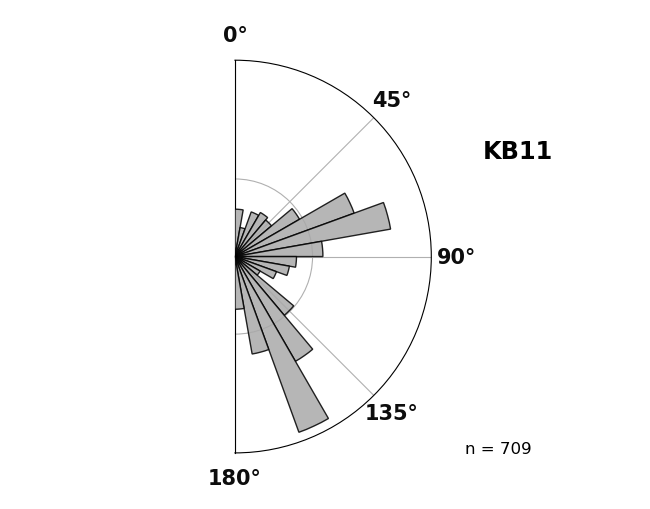
Plotting a rose plot of fracture network trace orientations
# Rose plot of network trace orientations
azimuth_bins, fig, ax = KB11_NETWORK.plot_trace_azimuth()
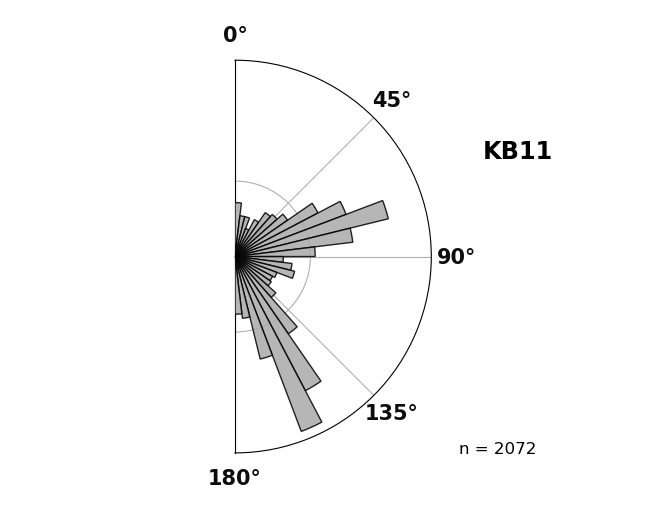
Plotting a rose plot of fracture network branch orientations
# Rose plot of network branch orientations
KB11_NETWORK.plot_branch_azimuth()
(AzimuthBins(bin_width=6.923076923076923, bin_locs=array([  3.46153846,  10.38461538,  17.30769231,  24.23076923,
        31.15384615,  38.07692308,  45.        ,  51.92307692,
        58.84615385,  65.76923077,  72.69230769,  79.61538462,
        86.53846154,  93.46153846, 100.38461538, 107.30769231,
       114.23076923, 121.15384615, 128.07692308, 135.        ,
       141.92307692, 148.84615385, 155.76923077, 162.69230769,
       169.61538462, 176.53846154]), bin_heights=array([ 23.85186242,  13.85935962,  13.87610052,   7.36702792,
        14.26115144,  23.39394256,  25.99082394,  33.56150329,
        72.13951553, 115.80451444, 204.6261432 , 115.58072624,
        52.52356542,  19.18518135,  27.11266615,  30.95261975,
        16.55924935,  14.77946813,  15.99990073,  24.51727887,
        72.23261948, 188.16203561, 286.88820952,  91.35469297,
        31.76997234,  27.22640228])), <Figure size 650x510 with 1 Axes>, <PolarAxes: title={'center': 'KB11'}>)
Numerical data is accessible with methods and class properties
pprint((KB11_NETWORK.branch_azimuth_set_counts, KB11_NETWORK.trace_azimuth_set_counts))
({'E-W': 1044, 'N-S': 1026}, {'E-W': 315, 'N-S': 394})
The azimuth sets were not explicitly given during Network creation so they are set to defaults.
pprint((KB11_NETWORK.azimuth_set_names, KB11_NETWORK.azimuth_set_ranges))
(('N-S', 'E-W'), ((135, 45), (45, 135)))
Total running time of the script: (0 minutes 0.604 seconds)